

Function Type:
Date and Time
Description:
YEARFRAC function in Excel or Google Sheets returns the year fraction representing the number of whole days between start_date and end_date.
Function Structure:
=YEARFRAC (start_date , end_date , [basis] )
Argument Breakdown:
start_date – The date from which to start.
end_date – The date from which to end.
[basis] – The type of day count basis to use.
These are the options for [basis] argument and how it look like mathematically.
0 – US (NASD) 30/360
1 – Actual/actual
2 – Actual/360
3 – Actual/365
4 – European 30/360
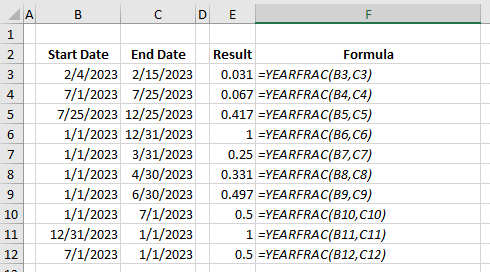
Start and End Dates can be interchangeable.
Example:
Still need help with Excel and Google Sheets? Get Instant Expert Help in Fiverr or PeoplePerHour platforms. Click one icon below.


We can also accept LEO, HIVE, HBD tokens as payment if we transact directly here in HIVE network.
or you can help me through https://www.buymeacoffee.com/cashheaven 😉
One thought on “YEARFRAC function”