

Function Type:
Date and Time
Description:
WORKDAY function in Excel or Google Sheets returns the serial number of the date before or after a specified number of workdays. This function is useful in formulas when you need to know the any number of business days after the date today. Think of it as when you submit your documents to apply for visa and you will be counting the expected business day that you will get back your passport.
Function Structure:
=WORKDAY (start_date , days , [holidays])
Argument Breakdown:
start_date – The date from which to start.
days – The working days before or after start_date. This number can be negative if you want to go backwards.
[holidays] – A list dates that should be considered non-work days. This is optional.
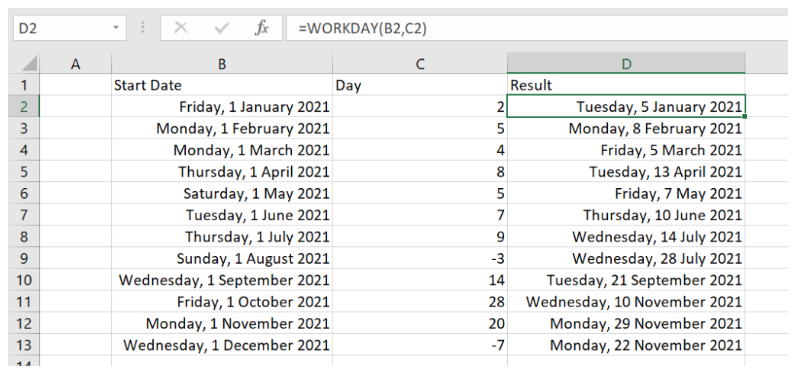
Example:
Still need help with Excel and Google Sheets? Get Instant Expert Help in Fiverr or PeoplePerHour platforms. Click one icon below.


We can also accept LEO, HIVE, HBD tokens as payment if we transact directly here in HIVE network.
or you can help me through https://www.buymeacoffee.com/cashheaven 😉
One thought on “WORKDAY function”